

CI/CD pipelines speed up software delivery, but performance testing is often delayed, resulting in late feedback and costly fixes. Many teams run tests earlier but fail to enforce performance as a deployment gate.
This article provides a practical framework for integrating LoadRunner Enterprise into CI/CD pipelines, enabling continuous, automated and enforceable performance validations with early regression detection.
The Problem: Shift Left in Theory Vs. Reality
Despite the theory, many teams:
- Run tests only in QA or staging
- Perform manual reviews without automated enforcement
- Fail to block deployments when performance thresholds are breached
The Real Challenge: It’s not the tools — it’s integration and enforcement. Shift left is effective only when performance is a primary release criterion, not just an earlier activity.
Why Early Performance Validation Matters
Delayed testing leads to late bottleneck discovery, slow feedback and production incidents. Integrating performance validation in CI/CD gives developers immediate feedback, enforces quality thresholds and transforms testing from reactive to continuous control.
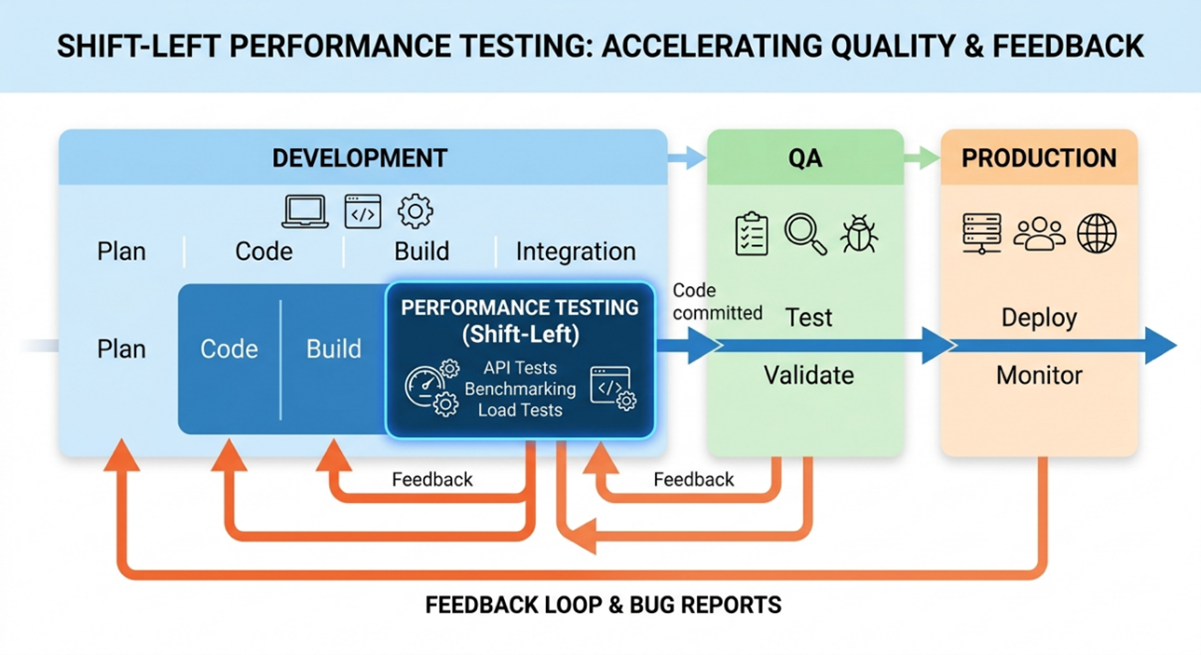
Open-Source Tools Vs. LoadRunner
Tools such as JMeter, Gatling and k6 integrate easily with pipelines. LoadRunner Enterprise offers deeper metrics and enterprise controls but requires added setup, including API authentication and cross-platform support.
Retail Domain Example
Early validation detects bottlenecks in critical services such as:
- Login API
- Product search
- Checkout API
Impact: Early detection prevents regressions, reduces QA cycles and increases confidence before production deployments.
Implementing Early Performance Validation in CI/CD
Validate application performance in development by running sanity suites on critical APIs and enforcing thresholds. Only promote builds that pass these checks to QA or staging.
Practical Approach in CI/CD
Select a Sanity Performance Suite
Instead of running full-scale load tests on every commit, define a subset of critical scenarios or APIs.
Example for a retail application:
- Login API: Ensures the authentication service scales under concurrent users.
- Product Search API: Validates search performance under typical load.
- Checkout API: Critical for revenue, must maintain low latency under load.
Run Automated Tests in Dev
Integrate LoadRunner (or JMeter/k6 for open-source pipelines) in the dev branch pipeline.
The CI/CD job triggers performance validation on these key APIs, measuring metrics like:
- Response Time
- Error Rate
- Transaction Throughput
- Enforce Thresholds
Define acceptable thresholds (e.g., failure rate <1%, API latency <300 ms).
If thresholds are breached, the pipeline fails, stopping the promotion to QA until issues are resolved.
Promote to QA or Staging
Once dev tests pass, the full test suite can run in QA or pre-production.
This staged approach reduces wasted QA cycles and focuses testing effort on areas that already meet basic performance criteria.
Example KPIs
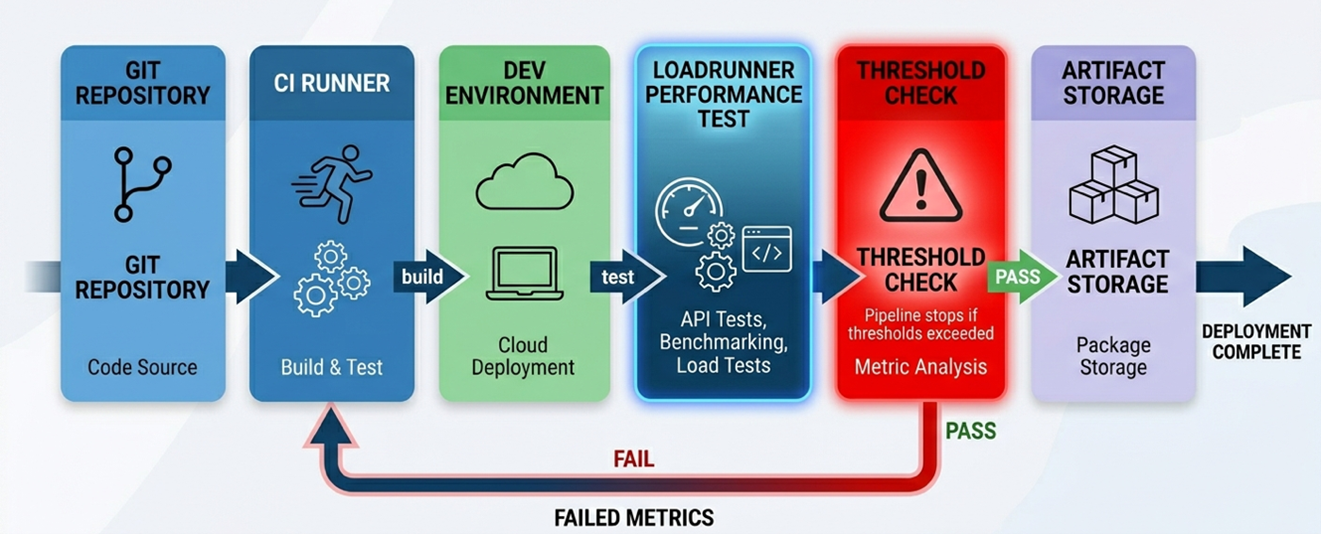
Framework Overview
The framework integrates LoadRunner Enterprise via pipeline configuration, automation scripts (Python) and GitLab YAML files. Tests trigger automatically, handle authentication, monitor failure rates and collect artifacts, supporting both Linux and Windows runners.
Pipeline Configuration
CI/CD pipelines trigger performance tests automatically on code changes.
- Required configuration parameters
- Test ID, instance ID, timeslot duration
- LRE URL, API token (Base64 encoded username:password)
- Domain, project name
Automation Script (Python)
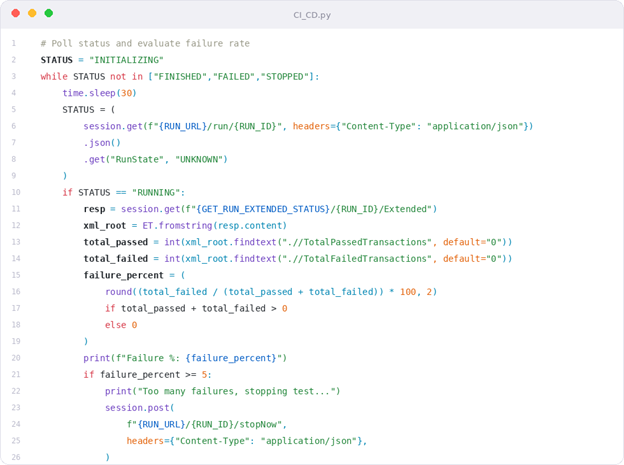
A lightweight script handles:
- Authentication with LoadRunner APIs
- Test execution
- Real-time monitoring of failure rates
- Automatic termination on threshold breach
- Artifact collection (raw results, reports)
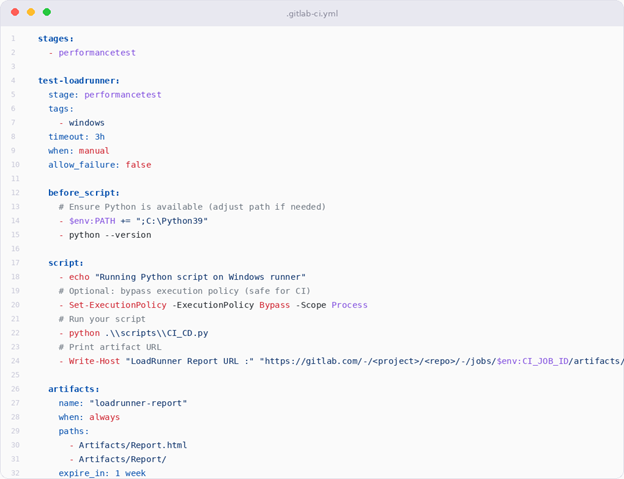
GitLab CI/CD YAML
- Execute tests on Linux or Windows runners
- Store artifacts for review
- Enforce thresholds at each stage
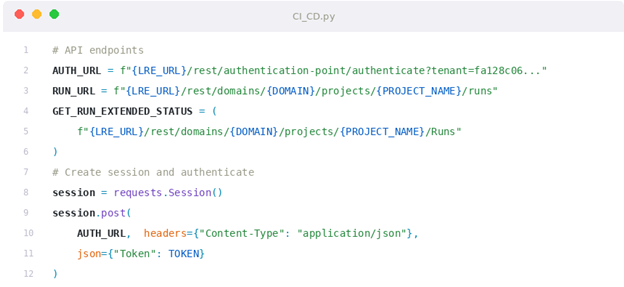
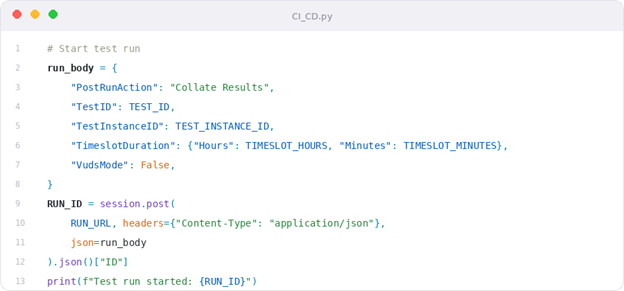
Note: The full implementation is available in a GitHub repository. The snippet below highlights the core logic for CI/CD integration.
Python Script Example
A script authenticates, triggers run, monitors failures and saves artifacts for review.
The following example shows a minimal pipeline stage for triggering performance validation.
GitLab CI/CD YAML Example
Defines pipeline stages, installs dependencies, executes tests and stores artifacts.
Key Features
- Automatic validation for every code change
- Live error monitoring
- Threshold-based test termination
- Secure API access and artifact management
- Cross-platform support
Beyond Shift Left
Continuous performance engineering uses observability data, adaptive pipelines and autonomous response to degradation — making performance a self-regulating property.
Common Pitfalls
- Running too many tests per commit
- Ignoring environment differences
- Failing to enforce thresholds
- Treating performance testing as only QA’s responsibility
Conclusion
True shift left is about enforcing performance as a release criterion in CI/CD, ensuring early detection, consistent enforcement and preventing unstable releases.
from DevOps.com https://ift.tt/43Txtof
Comments
Post a Comment