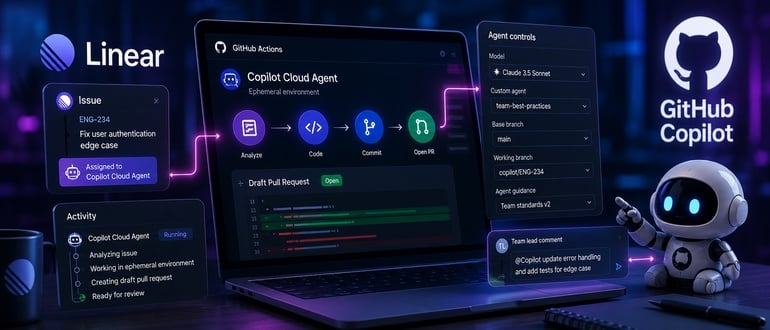

GitHub has moved Copilot cloud agent’s integration with Linear out of preview and into general availability, and the update brings more than a stability label. Along with GA status, GitHub added a set of controls that let teams shape exactly how the agent behaves on a per-issue or per-team basis, without leaving Linear.
The core workflow stays the same as it was in preview: Assign a Linear issue to Copilot cloud agent, and it analyzes the issue contents, opens a draft pull request, and works independently inside its own ephemeral development environment powered by GitHub Actions. Progress streams back to the Linear activity timeline, and the agent requests a pull request review once the work is done.
What’s new at GA is the control layer sitting on top of that workflow. Teams can now pick which model Copilot uses for a given task, point the agent at a custom agent defined in their repository so it follows team-specific conventions, and set the base and working branch to control exactly where a pull request lands and which branch the agent commits to. There’s also a way to steer a session mid-flight — mentioning Copilot in a comment feeds it new instructions while it’s still working, rather than waiting for the draft PR to iterate. Any of these settings can be applied issue by issue, or standardized across a workspace or team using Linear’s agent guidance feature.
That last piece is arguably the most consequential change for engineering leaders. Model choice and custom agents were previously things a developer configured inside GitHub itself. Now a team lead can set defaults once, at the workspace or team level in Linear, and have every delegated issue inherit them automatically.
“Every delegated issue inherits those defaults,” said Mitch Ashley, VP and practice lead, software lifecycle engineering & AI-native software engineering at The Futurum Group. “Branch targets and model selection bind the agent, while written guidance travels with the prompt.”
Installation is unchanged from preview: The GitHub Copilot for Linear app comes from the GitHub Marketplace, and setup requires organization owner permissions on the GitHub side and workspace admin privileges in Linear. Once installed at the org level, any team member can connect their own Copilot account and start delegating issues. Copilot cloud agent is available on Copilot Pro, Pro+, Business, and Enterprise plans, which puts this well within reach of most teams already paying for Copilot rather than gating it behind an enterprise-only tier.
Ashley frames this as a broader shift in where agentic coding actually gets configured. “The configuration surface for coding agents is moving into the planning tool,” he said. “Model selection, custom agents, and branch targets now get set where work is scoped, and GitHub becomes the execution environment underneath. Teams standardizing at the workspace level should know which of their defaults constrain the agent and which only inform it.”
That distinction — between settings that bind the agent and guidance that merely informs it — is worth sitting with. Branch targets and model selection are hard constraints; the agent can’t work outside them. Written guidance is closer to instruction than enforcement, which means teams leaning on workspace-level defaults should be clear-eyed about which controls actually guarantee behavior and which just shape it.
The mid-session steering capability deserves attention too. Up to now, adjusting an agent’s course usually meant waiting for the draft PR and leaving review comments — a review-then-revise loop. Being able to redirect a session while it’s still running collapses that loop, which matters for anyone who’s watched an agent head down the wrong path early and wished they could redirect it before it burned through a full session.
None of this changes the fundamental shape of what the agent is good at: well-scoped, low- to medium-complexity work like bug fixes, small refactors, and documentation updates, not open-ended architectural decisions. But the new controls do lower the operational friction that made some teams hesitant to standardize on agentic delegation from a planning tool. Custom agents mean the coding agent can be made to follow house rules automatically. Branch controls mean fewer surprises about where a PR lands. And team-wide agent guidance means those choices don’t have to be re-made by every developer, every time.
For teams already running Linear and Copilot side by side, the practical move now is less “should we try this” and more “what should our default configuration be” — and which of those defaults are actually rules versus suggestions.
from DevOps.com https://ift.tt/p1mq0DH
Comments
Post a Comment