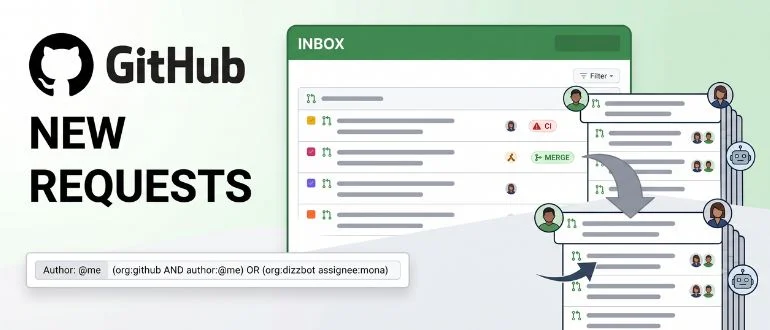

GitHub has made its overhauled pull requests dashboard generally available, giving developers and engineering managers a single view at github.com/pulls to track, prioritize, and act on the pull requests that need their attention.
The dashboard moves out of public preview after a rollout that started in March 2026 and shifted to opt-out preview in April. The centerpiece is Inbox, a home base that <cite index=”1-1″>surfaces review requests, pull requests that need fixing due to CI failures or new comments, and pull requests that are ready to merge or sitting in the merge queue</cite>. Developers can reorder or hide sections to fit their own workflow, and filter by repository or recent activity to cut through the noise.
Saved views are the other major piece. Instead of relying on browser bookmarks to jump back to a specific filter, developers can now <cite index=”1-1″>create, edit, and organize custom views based on their most-used search queries</cite>. GitHub also built in a set of smart defaults — Authored by me, Assigned to me, Involves me, and Review requested — along with <cite index=”1-2″>content assist and auto-complete to help developers find pull requests across repositories, teams, organizations, and projects</cite>.
For anyone managing pull requests across multiple orgs, the advanced search syntax is worth a look. It now supports AND/OR logic and nested queries, so something like <cite index=”1-2″>(org:github AND author:@me) OR (org:dizzbot assignee:mona) can pull results from multiple organizations in a single search</cite>.
GitHub also used the GA announcement to list what’s changed since preview. Reviewers can now move through their list with j and k keyboard shortcuts. A new team-review-requested-user filter <cite index=”1-3″>returns pull requests where someone has been asked to review as part of a team</cite>, and a review-involves filter <cite index=”1-3″>surfaces any pull request someone’s been asked to review, regardless of its current approval state</cite>. Perhaps most notably, the author filter now recognizes agent-created pull requests — <cite index=”1-3″>searching author:@me returns pull requests a developer directed GitHub Copilot to open on their behalf</cite>.
That last detail says a lot about why GitHub is investing in this dashboard now. Pull request volume isn’t growing the way it used to — it’s growing the way AI coding tools produce it, fast and increasingly authored by an agent rather than a person at a keyboard. GitHub’s changelog noted last month that its dashboard now attributes agent-created pull requests to the human who directed them, a small change that reflects a much bigger shift in how code gets written and reviewed.
That shift is putting real pressure on review pipelines. Faros AI’s telemetry study of more than 10,000 developers found that teams with heavy AI adoption merged 98% more pull requests, but PR review time rose 91% and average PR size grew 154%. LinearB’s 2026 analysis of 8.1 million pull requests told a similar story: Developers feel roughly 20% faster with AI tools, but end-to-end cycle time is actually about 19% slower once review queues are factored in. The bottleneck didn’t go away when AI sped up code generation. It just moved downstream, to the humans still doing the reviewing.
A better dashboard won’t fix that on its own. But a dashboard that helps a reviewer see what’s actually waiting on them, sorted by urgency instead of buried in a flat list, is a reasonable place to start. That’s especially true for engineering managers who are reviewing across many repositories and teams, where the old pull requests page made it easy for a stale request to disappear entirely.
There’s also a quieter benefit here: Visibility into where reviews are actually stuck. The dashboard separates direct review requests from team-level ones, splitting a “needs your review” section from a “needs your team’s review” section. Team review requests are notorious for sitting untouched because everyone assumes someone else will pick them up. Making that backlog visible instead of letting it hide in a shared queue is a small change with an outsized effect on how fast work actually moves.
None of this changes the underlying math. If a team is generating pull requests faster than it can review them, a better inbox just makes the queue easier to see — it doesn’t make it shorter. Some organizations are pairing dashboard-level triage with AI-assisted review tools that catch trivial issues before a human opens the PR, freeing up reviewer time for the judgment calls that require a person: whether an abstraction earns its complexity, or whether a piece of defensive code will still make sense to maintain six months from now.
“GitHub shipping a triage surface for pull requests confirms review is now the bottleneck: queues fill faster than humans can clear them,” said Mitch Ashley, VP and practice lead for software lifecycle engineering and AI-native software engineering at The Futurum Group.
“Engineering leaders must manage review capacity as deliberately as code generation,” Ashley said. “Teams that instrument where reviews stall will convert AI velocity into shipped software; teams that treat review as overhead will watch the gains sit in the queue.”
GitHub’s dashboard update won’t solve the review bottleneck on its own, but it’s a sign that platform vendors are starting to treat review triage as a separate problem from code generation. As AI-authored pull requests make up a larger share of what lands in every developer’s queue, the tools for sorting, filtering, and prioritizing that queue will matter as much as the tools that write the code in the first place.
The new dashboard is live now at github.com/pulls for all users.
from DevOps.com https://ift.tt/2vGWy5K
Comments
Post a Comment