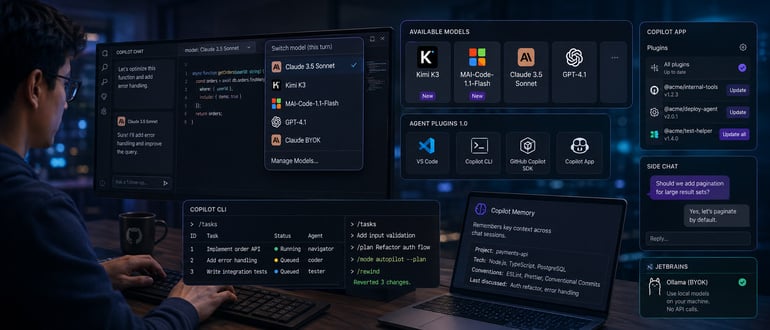

Most development teams don’t pick one AI model and stick with it anymore. They pick the best model for the job at hand and switch when the job changes. GitHub’s latest round of Copilot updates, published Aug. 13 in its weekly changelog covering the week of Aug. 10, reads like an admission that this is now normal — and that Copilot needs to be built around it rather than around any single model.
The headline additions are two new models. Kimi K3 is rolling out across Copilot Pro, Pro+, Max, Business, and Enterprise plans. MAI-Code-1.1-Flash arrives alongside it, with native image understanding and what GitHub describes as improvements in coding quality, instruction-following, tool use, and performance. Neither replaces anything. They sit next to the models already available, which is the point. GitHub isn’t trying to win developers over to one model family. It’s trying to make sure whichever model they trust is one click away.
That same logic shows up in Visual Studio Code 1.133, where developers can now switch models within a Claude session — moving between Claude BYOK and built-in Copilot models on a per-turn basis, without restarting the session or losing context. A developer can start a task with one model, hand off a step to another, and keep working. Mitch Ashley, VP and practice lead for software lifecycle engineering and AI-native software engineering at The Futurum Group, sees a cost hiding inside that convenience. “Developers already run two or three models and pick by task,” Ashley said. “Per-turn switching removes the restart and the record of which model wrote which line. The next engineer reviewing that code cannot reconstruct it.” Model choice, he said, “is now a runtime dependency with no field in the build record,” and by the time something breaks in production, that choice is invisible.
The second theme in this release is consolidation of the plugin ecosystem. Agent Plugins 1.0 is now generally available, and it works the same way across VS Code, Copilot CLI, the GitHub Copilot SDK, and the Copilot app. That’s a meaningful change for teams that have built internal tooling or extensions for one surface and had to rebuild it for another. The Copilot app picked up matching plugin management features — developers can see plugin versions and update them individually or all at once from Settings, instead of hunting through each surface separately.
The app also added side chat, which lets a developer respond to a question from a running agent without derailing the main conversation. It’s a small feature, but it points at a real problem teams run into with agentic workflows: an agent asks a clarifying question mid-task, and answering it either interrupts everything else or gets lost in the thread. Side chat is GitHub’s answer to that friction.
Copilot CLI got the heaviest set of updates this cycle. A new /tasks command lets developers manage subagents and check their status without leaving the terminal. Prompts, commands, and slash commands can now be queued while an agent is mid-task, so developers don’t have to sit and wait for one step to finish before lining up the next. The –plan and –mode autopilot flags can now be combined in headless mode, which automates both planning and implementation in a single pass — useful for CI pipelines or scheduled jobs where no one’s watching the terminal. And /rewind gives developers a way to undo Copilot’s changes without relying on git, which matters for anyone working in a repo where a clean commit history isn’t guaranteed at every step.
JetBrains users get two additions worth noting. Copilot Memory retains context across chat sessions, so developers no longer have to re-explain the same project details every time they open a new chat. And JetBrains now supports Ollama as a bring-your-own-key provider, extending the model-choice theme to local models running on a developer’s machine — no API call required.
None of these updates, taken individually, dramatically change how teams work. Taken together, they describe a tool that’s stopped trying to be the smartest model in the room and started trying to be the best place to manage whichever models a team already trusts. For DevOps and platform teams standardizing on Copilot across mixed environments, that’s arguably more useful than any single model upgrade. But Ashley’s point stands: nothing in this release records which model touched which line. That gap, as he put it, “has to close before this reaches every developer in the org.”
GitHub ships these updates weekly, and the pace shows in how incremental each item feels. But the direction is consistent: Less friction between models, more control over agents, and fewer reasons to leave the terminal or IDE to get any of it.
from DevOps.com https://ift.tt/cB1weOU
Comments
Post a Comment